Just as a physical wallet allows you to store your money, a blockchain wallet allows you to manage and use your cryptocurrencies and other blockchain-based digital assets. With the rising adoption of cryptocurrencies as an investment asset class, digital payments option, and digital economy facilitator, people who own cryptos should be familiar with blockchain wallets and their uses.
Here's what you need to know and some points to consider when choosing the type of blockchain or crypto wallet to use.
What is a blockchain wallet?
A blockchain or crypto wallet is a way to manage, secure, and use cryptocurrencies such as Bitcoin (BTC +1.76%) and Ethereum (ETH +3.66%) and other digital assets based on a blockchain (for example, an NFT). There are two basic types of blockchain wallets: software wallets and hardware wallets.
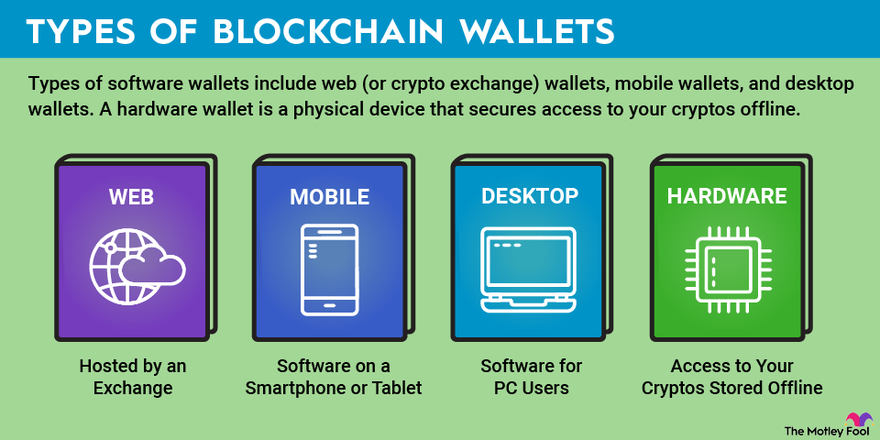
Types of software wallets include web (or crypto exchange) wallets, mobile wallets, and desktop wallets. A hardware wallet is a physical device that secures access to your cryptos offline. Here are some details on each.
Web-based wallets
These are easy-to-use wallets like those hosted by an exchange where you can buy and sell cryptocurrencies. Security keys are stored and managed by the wallet provider themselves. For example, if you buy crypto using Coinbase Global (COIN -2.88%), security keys that manage access to the assets are held in a web-based wallet that is always connected to the internet (known as hot storage). There are security issues with this (for example, if the exchange gets hacked), but this type of storage provides some of the easiest options for managing crypto transactions and purchasing cryptos.
Mobile wallets
A mobile wallet is software on a smartphone or tablet. Some of these apps are non-hosted, meaning you'll be responsible for saving and managing your private key to access your cryptos. Popular options include Coinbase Wallet (a separate app from the hosted custodial exchange), Mycelium, and Trust Wallet (which is part of the top crypto exchange Binance). Mobile wallets often provide hot storage since they can be linked to an exchange, but some may provide added security with offline options (known as cold storage).
Desktop wallets
Like their mobile counterparts, a desktop wallet is software for PC users. Examples of desktop-based wallets include MetaMask, Exodus, and Electrum. Many of these blockchain wallets offer cold storage options for added security.
Hardware wallets
A hardware wallet takes security a step further and allows for access to your cryptos to be stored on an offline piece of hardware. The wallet can be connected to a computer via USB or other port to facilitate transfers and transactions but are otherwise a way to keep crypto access in cold storage. This offers the highest level of security, but you'll be responsible for keeping track of your security keys (like a private password only you know; more on that below). Popular hardware wallets are made by Ledger and Trezor.
Why use a blockchain wallet?
Since cryptocurrencies dwell on a public digital ledger system and are accessed via the internet, cybersecurity should be top-of-mind for those planning on using and storing cryptocurrencies for the long term. Setting up a blockchain wallet should be a high priority for investors.
How a blockchain wallet works
A blockchain wallet does not actually hold your cryptocurrency. Cryptos reside on the blockchain itself (the digital ledger system used to manage cryptos and other assets using a specific blockchain network). A blockchain wallet is simply a way to secure the digital key that controls access to the cryptos you own.
Blockchain wallet features
- Provides a way to manage multiple types of cryptos for long-term use.
- Offers a public key used for crypto transactions.
- Some wallets offer a private key that act as a "digital safe" for extra security.
Depending on the type of wallet you set up, you'll be provided with two keys. The first is a public key, which is automatically created when setting up a wallet and is used for crypto transactions. Think of it as a web address. It will be shared with other crypto users for doing things like making purchases, accepting payments, or transferring cryptos to other accounts. The second is a private key (basically a password), which is one you'll want to keep safe since it will be used only by you to manage any movement of your cryptos. These private keys will be managed by you when using a mobile or desktop software wallet or a cold storage hardware wallet.
Related Investing Topics
How to use a blockchain wallet
Once you've decided on a blockchain wallet, you'll want to set up an account -- or download the app or software if you're using a mobile or desktop wallet. You'll be prompted to create security keys that you'll want to keep in a safe place. For added security, some wallets may also allow for two-factor authentication.
The next step is to transfer your cryptos from the exchange where you bought them to your wallet. For example, if you purchased via Coinbase, there is an option to "send" cryptos. From there, you'll be prompted to enter the wallet address information and the amount of crypto you wish to move.
Many blockchain and crypto wallet downloads are offered for free, and most don't charge anything if you're just storing your crypto assets. However, some make money by charging users for certain transactions, crypto staking, and consulting work. Hardware wallets such as those made by Trezor and Ledger are available for purchase, often for less than $200.
Making use of a blockchain or crypto wallet is a high priority for any investor or cryptocurrency enthusiast who plans on being involved in the space for any amount of time. Whether you're simply storing access to your cryptos while you remain invested in them or you're planning to use cryptos for payments and transactions, a wallet should be used to keep your digital assets safe. As an alternative to investing directly in cryptocurrencies, you can also consider investing in company stocks involved in the development and use of blockchain technology.
About the Author