If you're on a Galaxy Fold, consider unfolding your phone or viewing it in full screen to best optimize your experience.
My favorite thing about budgeting apps is being able to see my full financial picture at once. I want to see the money coming in, the money going out -- and the money left over.
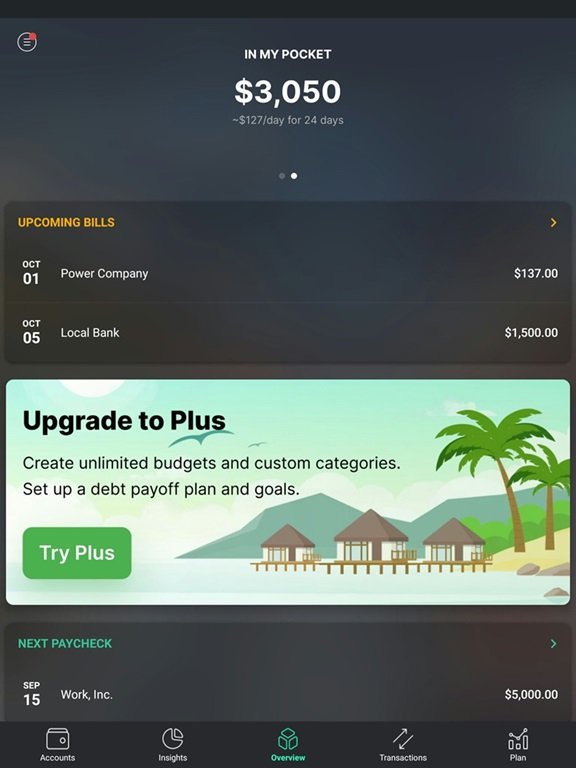
PocketGuard does all of this and more, giving you a great overview of your accounts and expenses, as well as tracking upcoming bills, and how much money you have in your (digital) pockets at any given time.
PocketGuard is a budgeting app that syncs with your bank and credit accounts to help you manage your finances. You can view all of your accounts in one place, and PocketGuard can automatically update your total income and latest transactions.
If you're prone to overspending, the "In My Pocket" feature may help. It uses estimates of your income and expenses to offer an instant look at how much money you should be safe to spend. And you can take a deeper look with simple spending reports using your most recent transactions.
Once you set up a PocketGuard account (and pay for Plus to unlock the useful features), you'll link your accounts, including bank accounts and credit cards. This allows PocketGuard to import your transactions automatically.
From here, you can organize and categorize your transactions. Add custom tags, set bill frequencies, and set up your savings goals.
With everything categorized, PocketGuard's In My Pocket algorithm can use your bills, income, expenses, and savings goals to show you how much money is left over -- as well as how long it needs to last. This lets you see at a quick glance of your app whether you have pocket money -- or empty pockets.
The best way to use PocketGuard is to link all of your financial accounts so that PocketGuard can import your transactions automatically. You can connect everything from checking accounts to loans and brokerage accounts.
PocketGuard says it can link to more than 18,000 financial institutions. It partners with well-known data aggregators Finicity and Plaid.
Linking your accounts is about a thousand times faster than manually entering every transaction every time. However, if you prefer this route and/or don't want to connect your accounts, you can do it manually, which is a nice option.
It's much easier to set informed savings goals when you can see all of your income and expenses in one place. This helps get rid of a lot of the guesswork and estimations about your monthly bills and spending habits.
Even better, you can set your savings goals inside the app so that they become part of your regular budget. PocketGuard can help you figure out how much you need to contribute each month to reach your goals, and it will also incorporate those contributions into your In My Pocket numbers so you aren't accidentally spending your savings contributions for the month.
The "In My Pocket" feature is what PocketGuard calls its "jewel." It uses a proprietary algorithm to analyze your bills, income, expenses, and savings goal contributions to show you what is in your "pocket" -- i.e., what should be safe to spend -- at any given time.
If you've ever overdrafted your checking because you forgot an expense was upcoming, this feature could be very useful for you. (Personally, I would take this feature with the proverbial grain of salt; just because the algorithm says you can spend that money doesn't necessarily mean you should.)
Make sure you're getting the best account for you by comparing savings rates and promotions. Here are some of our favorite high-yield savings accounts to consider.
| Account | APY | Bonus | Next Steps |
|---|---|---|---|
Open Account for SoFi Checking and Savings
On SoFi's Secure Website.
4.90/5
Our ratings are based on a 5 star scale.
5 stars equals Best.
4 stars equals Excellent.
3 stars equals Good.
2 stars equals Fair.
1 star equals Poor.
We want your money to work harder for you. Which is why our ratings are biased toward offers that deliver versatility while cutting out-of-pocket costs.
|
up to 3.80%
Rate info
Earn up to 3.80% Annual Percentage Yield (APY) on one SoFi Savings account with a 0.70% APY Boost (added to the 3.10% APY as of 5/28/26) for up to 6 months. Open your first SoFi Checking and Savings account and receive eligible direct deposits OR qualifying deposits of $5,000 every 31 days by 12/31/26. Rates are variable, subject to change. Terms apply at sofi.com/banking#2. SoFi Bank, N.A. Member FDIC.
Min. to earn: $0
|
Earn $50 or $400 and +0.70% Boost on Savings APY with direct deposit. Terms apply.
Earn up to 3.80% Annual Percentage Yield (APY) on one SoFi Savings account with a 0.70% APY Boost (added to the 3.10% APY as of 5/28/26) for up to 6 months. Open your first SoFi Checking and Savings account and receive eligible direct deposits OR qualifying deposits of $5,000 every 31 days by 12/31/26. Rates are variable, subject to change. Terms apply at sofi.com/banking#2. SoFi Bank, N.A. Member FDIC. |
Open Account for SoFi Checking and Savings
On SoFi's Secure Website. |
Open Account for NexBank High-Yield Savings Account from Raisin
On Raisin's Secure Website.
4.70/5
Our ratings are based on a 5 star scale.
5 stars equals Best.
4 stars equals Excellent.
3 stars equals Good.
2 stars equals Fair.
1 star equals Poor.
We want your money to work harder for you. Which is why our ratings are biased toward offers that deliver versatility while cutting out-of-pocket costs.
|
4.15%
Rate info
Earn a guaranteed 4.15% APY for 90 days. After that, your savings keep growing at a competitive standard rate — currently 3.97% APY (subject to change). No minimum account balance required. Deposit or withdraw at any time with no additional fees. See product terms for complete details.
Min. to earn: $1
|
Earn up to $1,200 when you sign up and fund your account using code SUMMER26.¹
|
Open Account for NexBank High-Yield Savings Account from Raisin
On Raisin's Secure Website. |
Open Account for Happen Bank LevelUp Savings
On Happen Bank's Secure Website.
4.70/5
Our ratings are based on a 5 star scale.
5 stars equals Best.
4 stars equals Excellent.
3 stars equals Good.
2 stars equals Fair.
1 star equals Poor.
We want your money to work harder for you. Which is why our ratings are biased toward offers that deliver versatility while cutting out-of-pocket costs.
|
4.00% APY with $250+ in monthly deposits
Rate info
*LevelUp Rate of 4.00% APY applied to full balance with $250+ in deposits in Evaluation Period. Otherwise, accounts earn Standard Rate of 3.00% APY. LevelUp Rate applies to first two statement cycles. Rates variable & subject to change at any time. See terms: https://www.happen.com/legal/deposits/levelup-savings-t-and-cs
Min. to earn:
|
N/A
|
Open Account for Happen Bank LevelUp Savings
On Happen Bank's Secure Website. |
¹New customers only. Earn a cash bonus (the "Base Bonus") when you deposit and maintain funds with partner banks on the Raisin platform. Customers will receive a Base Bonus of $50 for depositing between $10,000 and $24,999; $125 for depositing between $25,000 and $49,999; $250 for depositing between $50,000 and $99,999; $500 for depositing between $100,000 and $199,999; and $1,000 for depositing $200,000 or more.
Customers may earn an additional bonus by setting up a recurring deposit within 14 days of their initial deposit (the “Recurring Deposit Bonus”). To qualify, the recurring deposit must be established within 14 days of the initial deposit date and it must execute at least two (2) times within 90-days of the initial deposit. Recurring Deposit Bonus eligibility is determined by your Base Bonus tier:
Customers are eligible to earn the Recurring Deposit Bonus associated with their Base Bonus tier or any lower Recurring Deposit Bonus tier. For example, a customer with an initial deposit of $200,000 (qualifying for the highest Base Bonus tier) whose aggregate recurring deposits total $500, is eligible for the lower tier and will receive the $50 Recurring Deposit Bonus. However, setting up a recurring deposit greater than your Base Bonus tier's required threshold will not qualify you for a higher Recurring Deposit Bonus.
The Recurring Deposit Bonus is paid in addition to the Base Bonus. To qualify for the Base Bonus and Recurring Deposit Bonus, your first deposit must be initiated between June 1, 2026, and August 31, 2026, by 11:59 PM ET, and the promo code SUMMER26 must be entered at the time of sign-up. Only funds deposited within 14 days of the initial deposit date and maintained with partner banks on the Raisin platform for 90 days will be eligible for the Base Bonus. Bonus cash will be credited directly to your Cash Account within 30 days of meeting all qualifying terms. This offer is available to new customers only and may not be combined with any other bonus offers. Raisin may modify or end this offer at any time and may withhold or revoke bonuses in cases of fraud, abuse, or violation of these terms or Raisin’s Terms of Service.
Although PocketGuard does technically have a free version you can explore, it has so many limitations to it that it's barely more than a meager demo of the real product.
Want to add more than one account? Upgrade. Want to set savings goals? Upgrade. Want to set up a debt payoff plan? Upgrade.
Oh, and the Plus ads are a bit much, too. A third of the main Overview page on my tablet was a slideshow-style ad for premium services.
Even if you pay for the extra features, even those features have limits, particularly when it comes to data analysis. You can see a few basic pie and bar charts on grouping expenses by category or merchant, and some simple reports. But that's about it.
For an app that brings together all of my financial data in one place, I really want to be able to play with that data and analyze it every which way. This app is not the app for that.
On the plus side, you can export your transaction history via CSV file -- provided you have a Plus subscription -- so you could potentially plug that data into a spreadsheet and manipulate it on your own.
As far as I can tell, there are no free trials for the PocketGuard Plus subscription, so if you want to try out the premium features, you're going to have to pay for it. And this isn't a cheap app -- at least, not anymore.
My research shows there have been a ton of changes to the pricing for PocketGuard over the last year, and the result is that the app now costs double what it did just 10 months ago.
That being said, once I signed up for an account, I was offered a discount on my first month. But that still means giving out your credit card info and paying to test the advanced features.

You can use the free version of PocketGuard for no cost, but you'll be sacrificing most of the app's features. If you want to upgrade to PocketGuard Plus, you have three options:
From what I've seen from users, PocketGuard has been doing a lot of price testing over the past year and you may or more not see all prices or products. (I only found the lifetime option listed in the mobile app, it was nowhere in the browser.)
Online opinions on PocketGuard aren't extensive, but what's there are a bit mixed. I found a few users who are mostly happy, and a few others who report finding the platform buggy and the customer service lacking.
You can access PocketGuard via a browser, but I found it worked better through the mobile app (the website was slow and buggy in some browsers). The interface itself is clean and easy to navigate, though the upgrade ads are annoying if you are using the free version.

PocketGuard app overview. Image source: PocketGuard, captured by author.

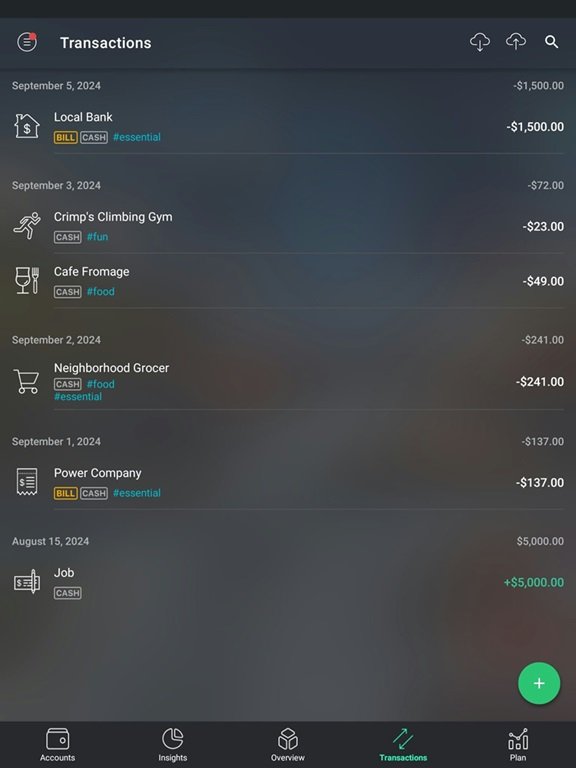
PocketGuard Transactions tab. Image source: PocketGuard, captured by author.
Yes, PocketGuard is generally considered to be safe to use. It partners with Finicity and Plaid to link your financial accounts. All three companies say they use advanced encryption and digital security protections.
If you want an app with more data tools: Monarch Money is a very comprehensive budgeting and money management app that lets you connect not just bank and credit card accounts, but investment accounts, loans, and other assets as well. It also offers robust data analysis tools and graphs to take deeper dives into your finances.
If you want an app that budgets and tracks credit: Rocket Money offers a more holistic approach to personal finance with tools that go beyond basic budgeting. This includes credit monitoring, as well as helping you find -- and cancel -- unwanted subscriptions.
Not itself, no. But PocketGuard works with a company called Billshark to offer bill negotiation service. There is a fee for this service.
The free version of PocketGuard is very barebones and does not offer much utility. If you like the app and want to use it, it may be worth subscribing. The app is costly, however, so it may be a good idea to try it for a month before committing to a full year or lifetime subscription.
Yes, PocketGuard still offers a lifetime subscription. However, the option isn't available until after you create a free account.
Motley Fool Stock Disclosures
The Motley Fool has a disclosure policy.